

A versioning + visual diffs system for OpenAPI endpoint documentation.
I designed and built a tool that automatically versions OpenAPI specs on each merge and allows users to view diffs between those versions. The entire experience was designed to be developer-friendly with a simple installation process, automated workflows, and copyable AI-chat prompts for making changes.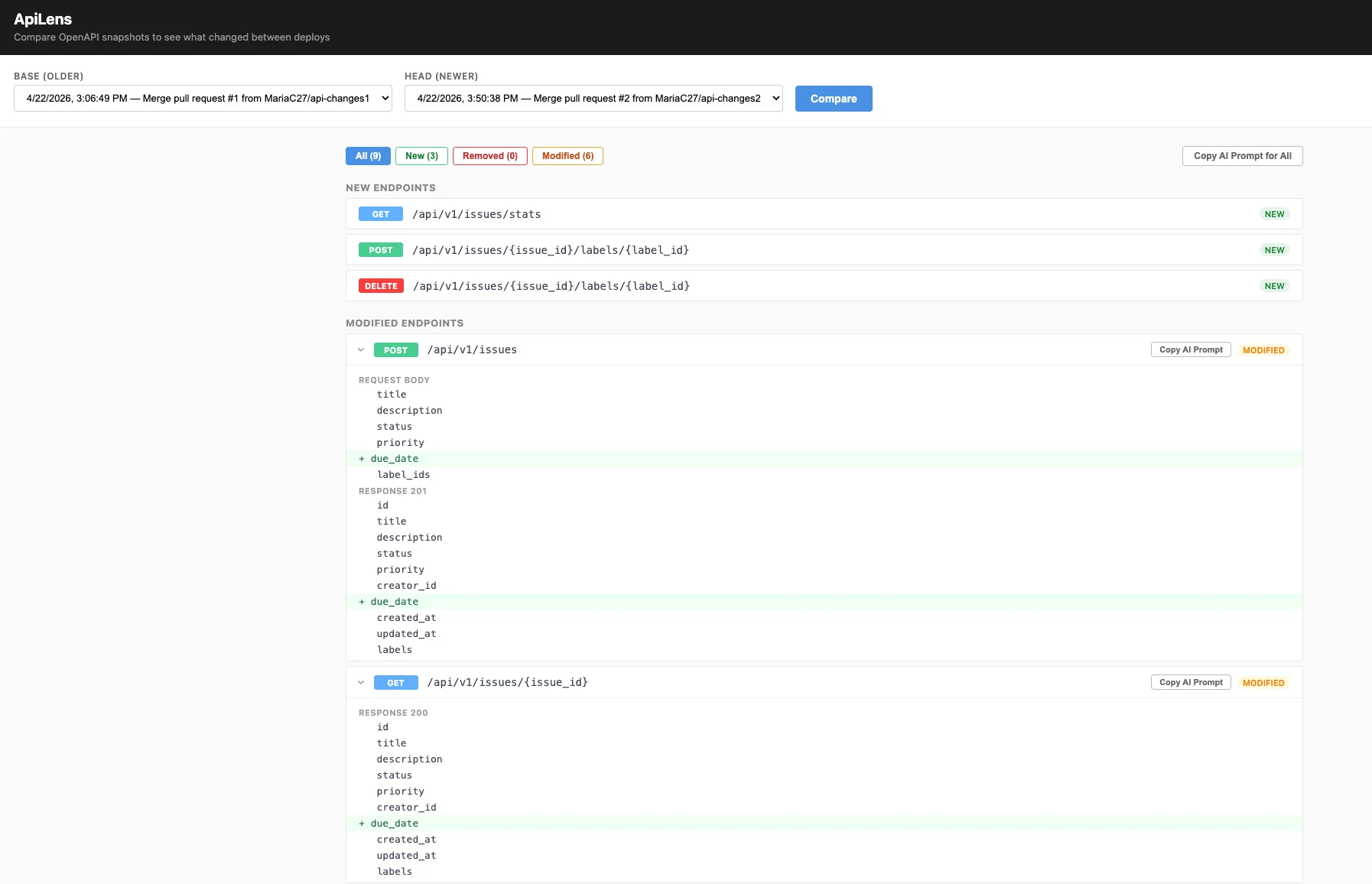
Problem
Difficult communication between backend + frontend about endpoint structure changes. When endpoint docs are updated, it’s hard to tell what exactly changed in the most recent update. Frontend teams need an easy way to see what changed in the api in order to update types and pages accordingly. Good handoff documentation is essential, but often tedious, manual, and repetitive to create and use.My Experience
I’m a design engineer who works mostly with the frontend code. Oftentimes, when there is an update made to our api, it is hard for me to tell exactly what changed just from looking at our auto-generated endpoint documentation, which only shows the most recent version. Without an easy way to see differences, I often resorted to comparing old and new endpoint structures by eye, which was very inefficient. Another option was just to paste the entire new structure into an AI prompt, which worked but reduced my visibility and knowledge of what changed.The Need
I needed a way to easily see the “diff” of what changed between the previous endpoints and the updated endpoints. And not just for the most recent update; I wanted to be able to compare the endpoints at different points in time as well. I also wanted a smooth automatic system that doesn’t require manual downloading and script running. It should update and provide visibility automatically when updates are made, reducing time spent creating handoff tickets and making the diff information immediately available and skimmable without extra work each time.Idea
A tool to take “snapshots” of the docs at certain points (say at each merge to main) and then compare snapshots with a color-coded diff. This would allow frontend teams to see at-a-glance which endpoints changed and field-level changes in payload and response structures.Initial Research
Our team uses FastAPI, which already handles automatic openapi documentation updates. There is a json file (openapi.json) that stores all the current api endpoint info, which is rendered on the docs site using Swagger UI. Having the json file already makes the diff and versioning process relatively more straightforward, I just needed to figure out how to snapshot and diff that json and display the results in a user-friendly manner. I found a few existing tools which handle diffing the openapi json: openapi-diff and swagger-diff. However, it seems that both are focused on creating a good diff but aren’t very user-friendly; users need to run script in terminal and manually paste in different json files, then take the html diff output and render it themselves for each comparison. At this point, I realized that the key differentiator of this project is not the idea of the api diff itself, it’s about making the diff process user-friendly through versioning, automatically running workflows, and a user-friendly interface. I could even leverage the existing tools for the diffing logic, as my project would be focused on creating a good experience.V1 Implementation: Diffing Logic and PR Comment
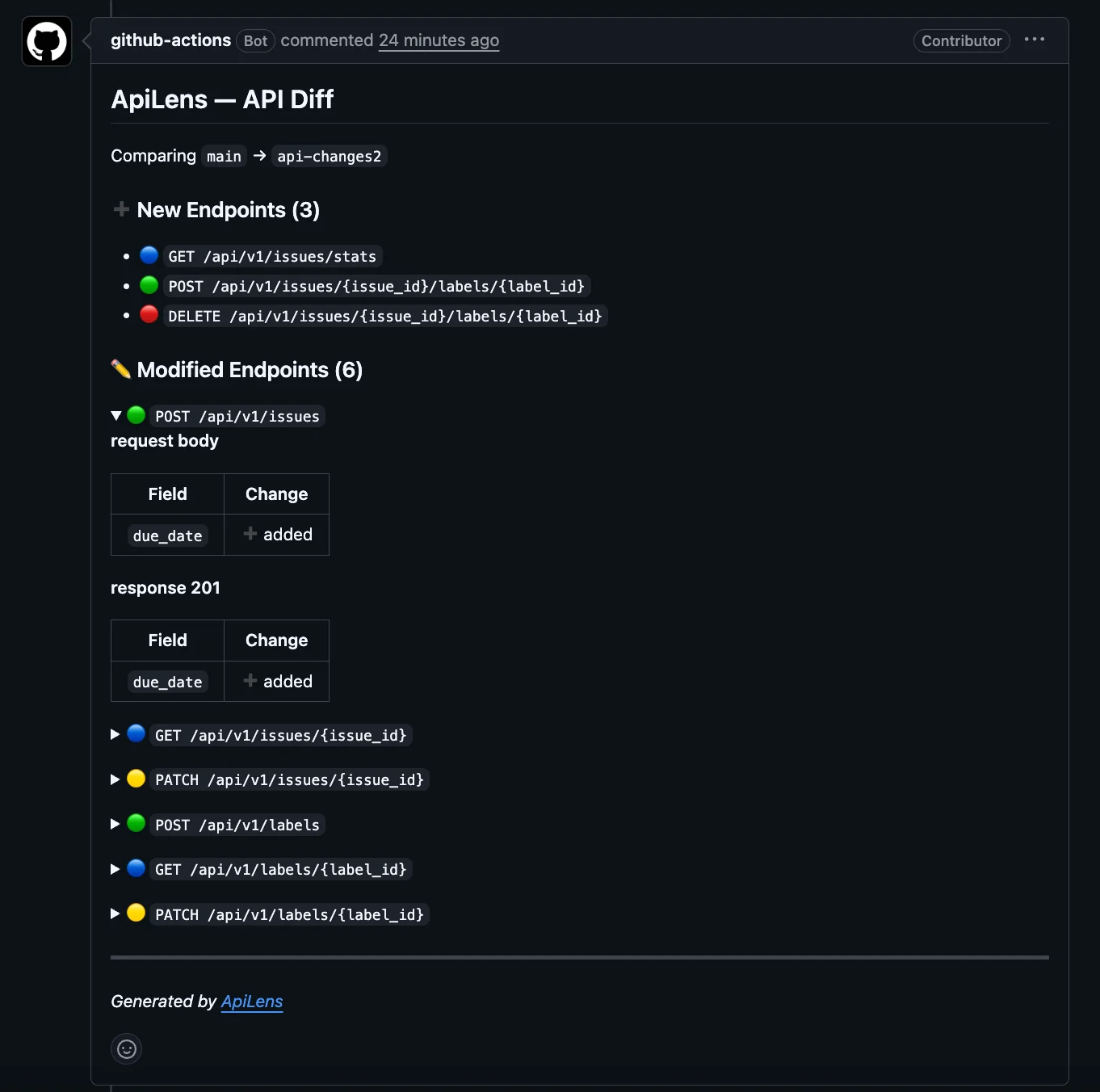
To start, I asked myself — where do devs actually look? No one wants and will remember to manually download and run something, then interpret raw output. The versioning system and diff output needs to be in an easy-to-find location and require minimal supervision. Some options include: a PR comment (useful to have but lacks flexibility in visualization), a Slack notification (we tried this and was too busy / hard to read, got lost), or a lightweight UI (ideal solution). I decided to start with the PR comment — allowing me to focus on the logic of getting and comparing the two json files first before worrying about file storage or a UI which could come later. General steps (implemented in a github actions workflow):- Get the OpenAPI spec from both the base branch and the PR branch
- Compare the two specs at the field level
- Post a comment on the PR summarizing what changed
V2 Implementation: Version Storage and Diff UI
The next step was to take “snapshots” (versions) of the openapi json on each merge to main, so those snapshots can then be compared and visualized on a UI. The automated nature of this is key, as this ties back to the initial goal of reducing developers’ manual work and differentiating ApiLens from existing tools. The workflow runs whenever anything that touches the backend folder is merged into the main branch (we have a monorepo). It snapshots the current openapi json file, gives it a name with a unique timestamp, and puts it into a folder in the repo called openapi-snapshots. I decided to store the json snapshots in the repo (not a separate s3 bucket as I had originally planned) as this reduces setup time, has easier visibility, and makes the workflows easier to adopt and run within any repository. Once at least two snapshots are accumulated, the user can use the UI to compare and diff two different snapshots. For the UI, I added a new router to our app with endpoints to list and get snapshot content, then render simple html on a new route for the UI. For the display itself, I tried to roughly follow the UI of our existing documentation site (for the sake of maintaining familiarity for users) except with highlighting to show field-level diffs.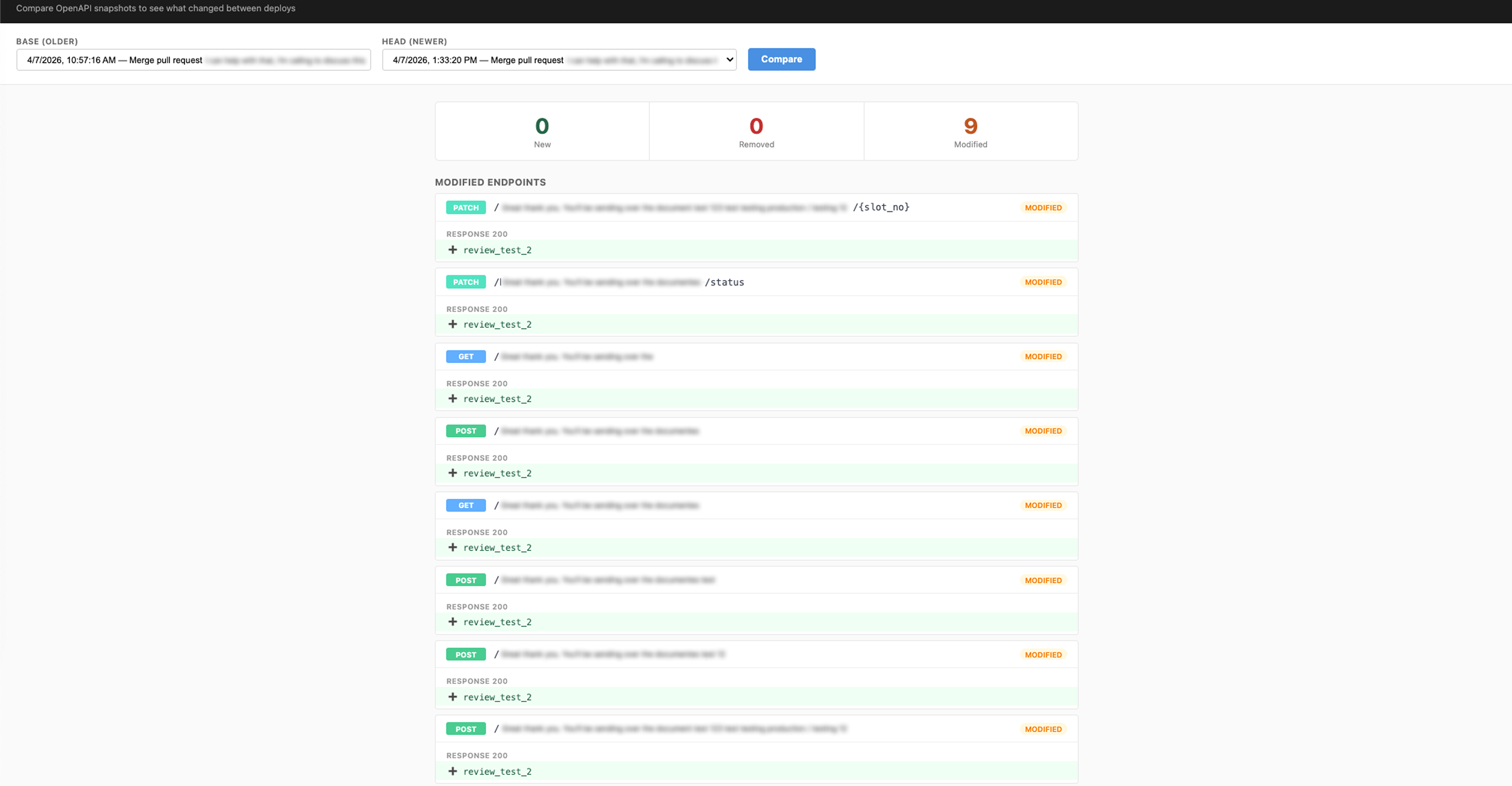
V3: UI Edits and Developer-Friendliness
Made a few edits to make the UI more user friendly:- Show the entire payload + response with modified fields highlighted. Allows for at-a-glance assessment of what changed in relation to the previous structures.
- Make each endpoint’s details collapsible
- Ensure the first dropdown always contains the older version
- Making one-click copyable snippets ready that have instructions to give an AI tool about what changed. Available on each endpoint and for all of the modified endpoints between the two versions. Important for making this developer-friendly!